Coming soon

Booking software for pool halls, snooker clubs and sports bars

Run your pool hall, not a spreadsheet.

Every table, booking, event and penny in one place. Staff see who’s on which table, how long they’ve played and what they owe. You see what every venue took tonight.

UK 1WALK-IN
1:12:59
20p/min · so far £14.60
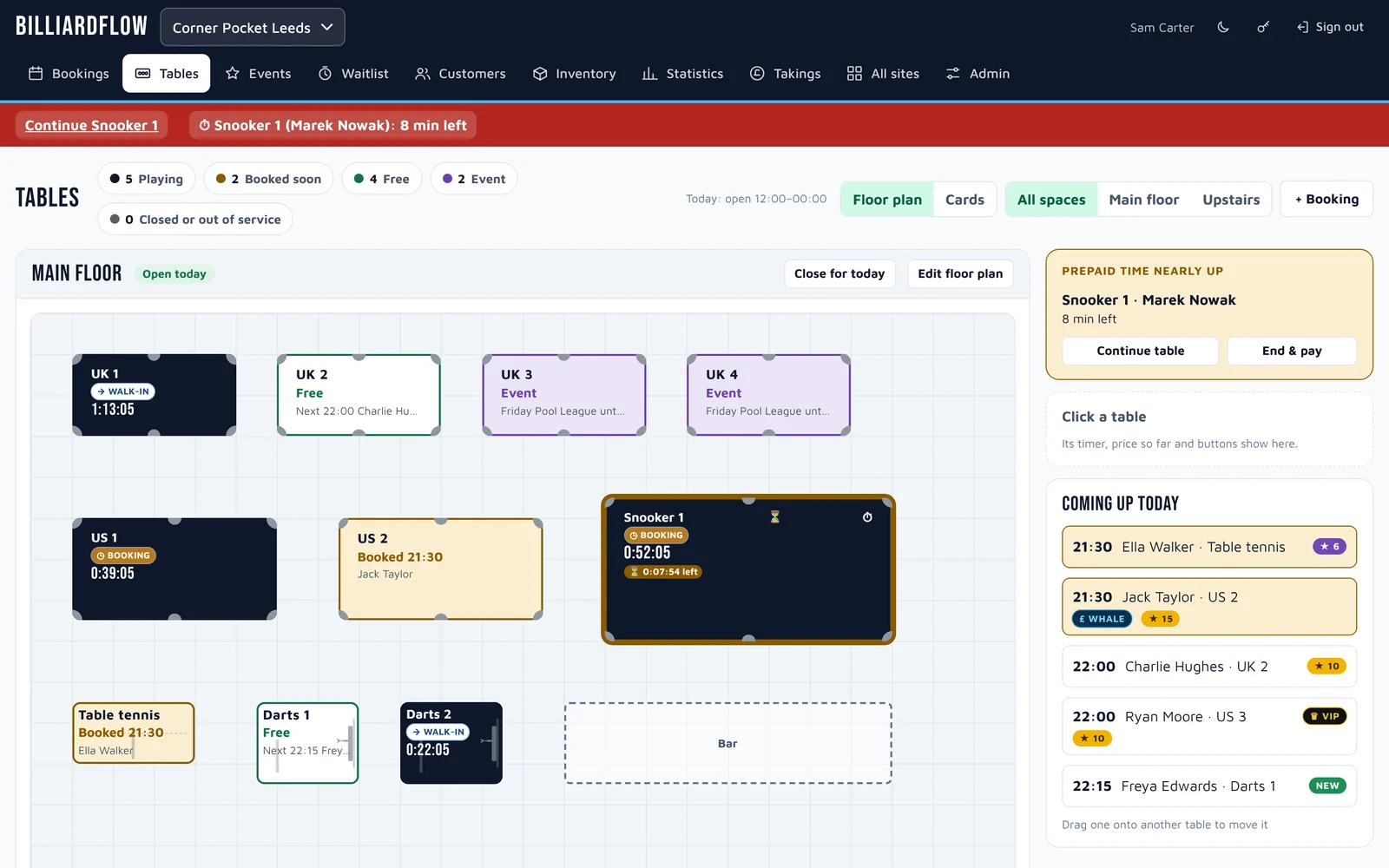
The Tables screen in BilliardFlow: a pool hall’s live floor plan with tables playing and their clocks, two held for a league night, tables booked for 21:30, a prepaid-time alert and a ‘Coming up today’ list.
  • No more lost walk-outsAnyone who leaves without paying is flagged the next time they book or walk in.
  • Prepaid time that counts downThe table shows the minutes left and warns you when they’re nearly up. Nobody plays for free.
  • Bookings from your websiteRead straight from your booking-form emails, or from a plugin on your own site.
  • Tonight’s takings, every venueHead office sees each session, the totals and the walk-outs without ringing round.

What it does

Everything on the floor, on one screen

Staff use it on the till PC, a tablet or their phone. There’s nothing to install, and it’s quick to learn because it looks like your room.

Live View

A live floor plan of your actual room

Draw each floor to match the real thing: UK and US pool, snooker, table tennis, darts and VIP rooms, plus the bar, pillars and sofas. Every table shows whether it’s playing, booked soon, free, held for an event or closed.

  • One tap starts the clock for a booking or a walk-in.
  • End & pay works out the price from the per-minute rate for that kind of table.
  • Moving a group to another table mid-game? Drag it across and the price carries on.
  • Ended a table by mistake? Undo it any time until the end of the day.
A table selected on the floor plan: customer with badges, a big running clock, price so far with a loyalty discount, and the End and pay button.

Bookings & waitlist

The whole day on one timeline

Tables down the side, time across the top. Drag a booking to change its time or its table. Bookings that want a kind of table but haven’t got one yet wait in their own “No table yet” lane.

  • Bookings come from staff, from the booking-form emails in your venue’s mailbox, or straight from your own website, showing free tables in real time.
  • Confirmation emails go from your venue’s own address, using templates head office writes.
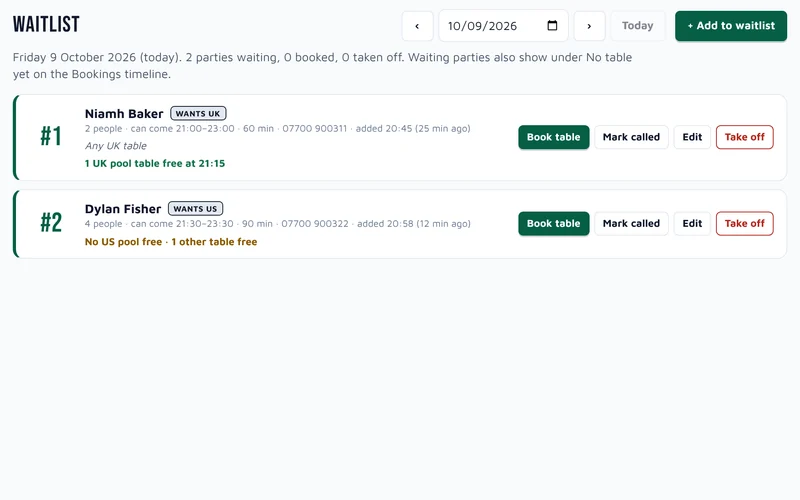
  • A first-come, first-served waitlist shows what’s free for each party. One click books them in.
  • No-shows and cancellations stay on each customer’s history.
The bookings timeline: every table across the day, finished sessions with prices, a league night, and the waitlist in the ‘No table yet’ lane.
The waitlist, showing what is free for each waiting party.

Sofas & stadium seating

Book seats, not just tables

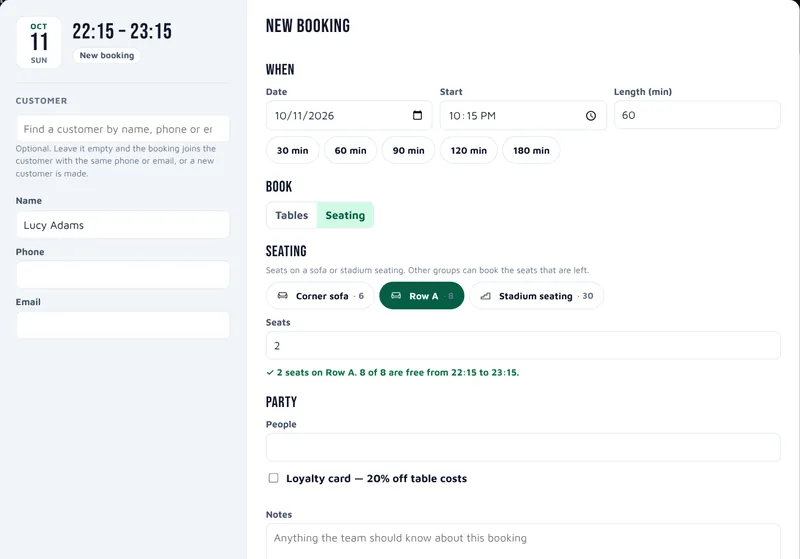
Sofas and stadium seating get their own row on the timeline. Book a group onto a few seats, and other groups can share the seats that are left.

  • Each booking shows how many seats it takes, like 10 of 30 seats.
  • When bookings overlap they join into one Multiple bookings slot. Click it and each booking opens on its own line.
  • Head office chooses which seating can be booked, for every sofa at once or piece by piece.
  • Customers can book seats from your website too, and see how many are free right now.
The timeline with a row for each sofa and the stadium seating: one booking shows 5 of 8 seats, and four overlapping bookings open into a line each under a Multiple bookings slot.
A new booking set to Seating: pick the sofa or stadium seating and the number of seats, with a line saying how many are free.

Events

League nights, parties and the big ones

Set up a Party, Corporate booking with food and drink packages, or a League night. Each one holds the tables it needs, so nobody can double-book them. Prepaid pitchers and pizzas go on the event.

Main Events addon

Fight nights, tournaments and screenings that take a whole floor get a seat sheet: groups on sofas, booths, stools and rows, tables and rooms, with guests, deposits (only the last 4 card digits are kept) and printouts.

Tick Show on the website and customers can book their own seats at a Main Event. Their group goes straight onto the seat sheet, marked Website.

The seat sheet for a 9-ball tournament: sofa, booth and stool rows filling up, tables for groups, and deposits taken.

Customers

Know your regulars, and your walk-outs

Every booking finds or creates the customer from their phone number or email, so you build up a record without extra typing. Badges show up wherever they appear:

NEW↺ RETURNING★ REGULAR★ TOP♛ VIP£ WHALELOYALTYBLACKLISTWALK-OUT
  • Profiles with visits, spend, last visit, upcoming bookings, history and staff notes.
  • A loyalty card that takes 20% off at the till.
  • Head office can find, export and redact a person’s data when they ask (GDPR).
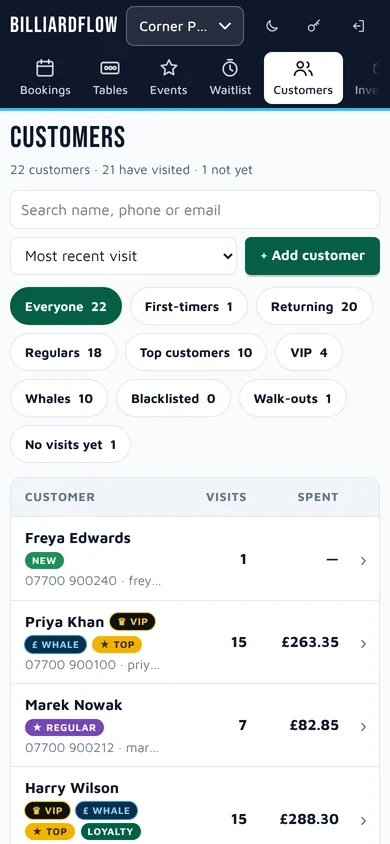
The customer list with VIP, TOP, WHALE and LOYALTY badges, visits, last visit, next booking and spend.

Head office

See what every venue took tonight

Statistics, Takings and Admin are for head office logins only. Venue staff see the floor; you see the money.

  • Takings: every session for the day, with totals, prepaid and walk-outs.
  • Statistics: bookings per day, table types, sales, busiest times, no-shows and walk-outs over 7, 30 or 90 days or a year.
  • All sites: every venue at a glance.
  • Admin: venues, prices per minute, opening hours, floors, logins and invites, your logo, email set-up, billing and backups.
Takings for the day: money taken, an unpaid walk-out flagged in red, and every session with its times, rate and price.

Inventory

Where did all the cues go?

Inventory Control addon

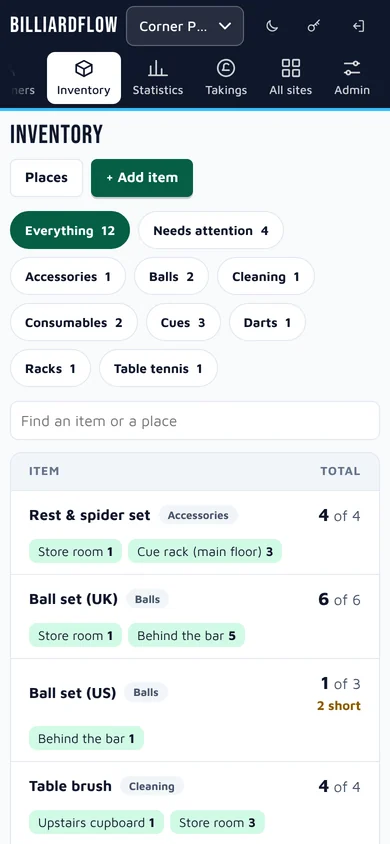
Keep count of cues, triangles, ball sets, chalk, brushes, darts and bats at each venue: how many, where they are, and what’s damaged, short or missing. Staff move items and report problems with one button, and the log shows who did what.

Inventory: items by type, where each one is kept, and damaged and short counts.

Website booking

Let customers book on your own website

Add BilliardFlow’s booking to the website you already have. Customers see which tables and seats are free and book a time that’s really available. The booking lands on your timeline straight away, so there’s no double-booking and nobody has to type it in.

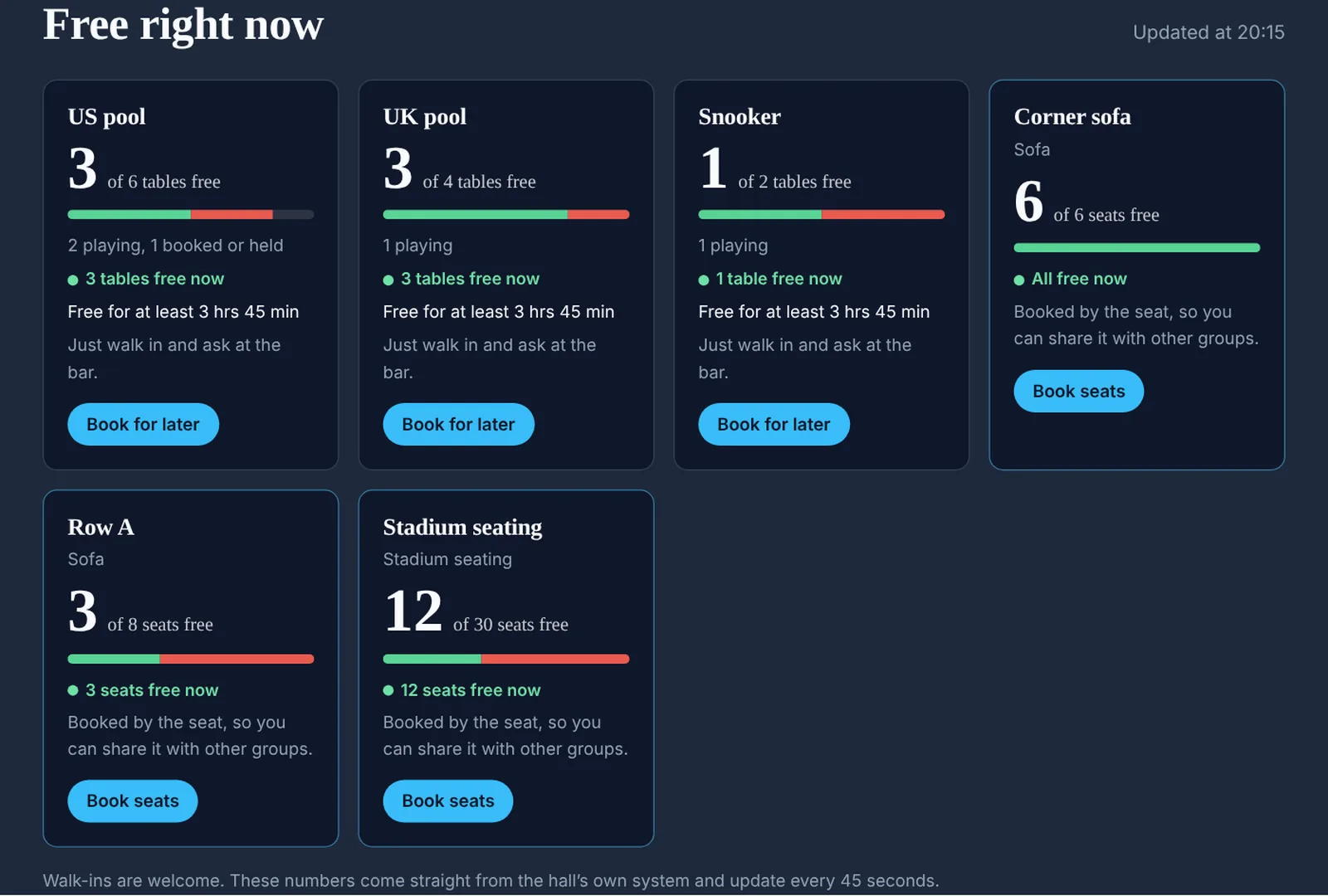
  1. 1They see what’s free right now

    A venue website’s ‘Free right now’ panel: tables free of each kind, and seats free on the corner sofa, Row A and the stadium seating.
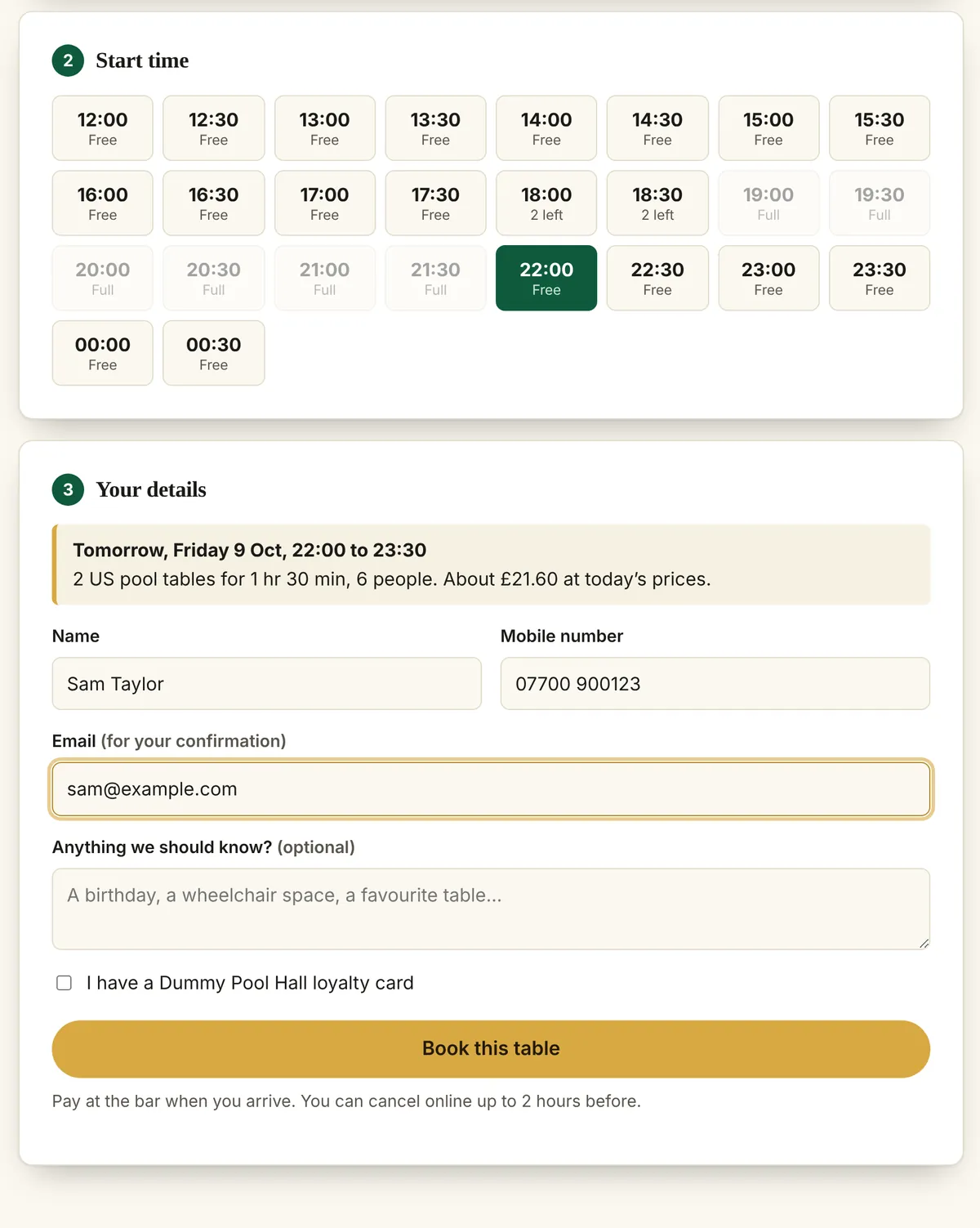
  2. 2They pick a time that’s really free

    The booking form on the venue website: start times marked free, 2 left or full, then the customer’s details and a summary with the price at today’s rates.
  3. 3Booked in, with a reference

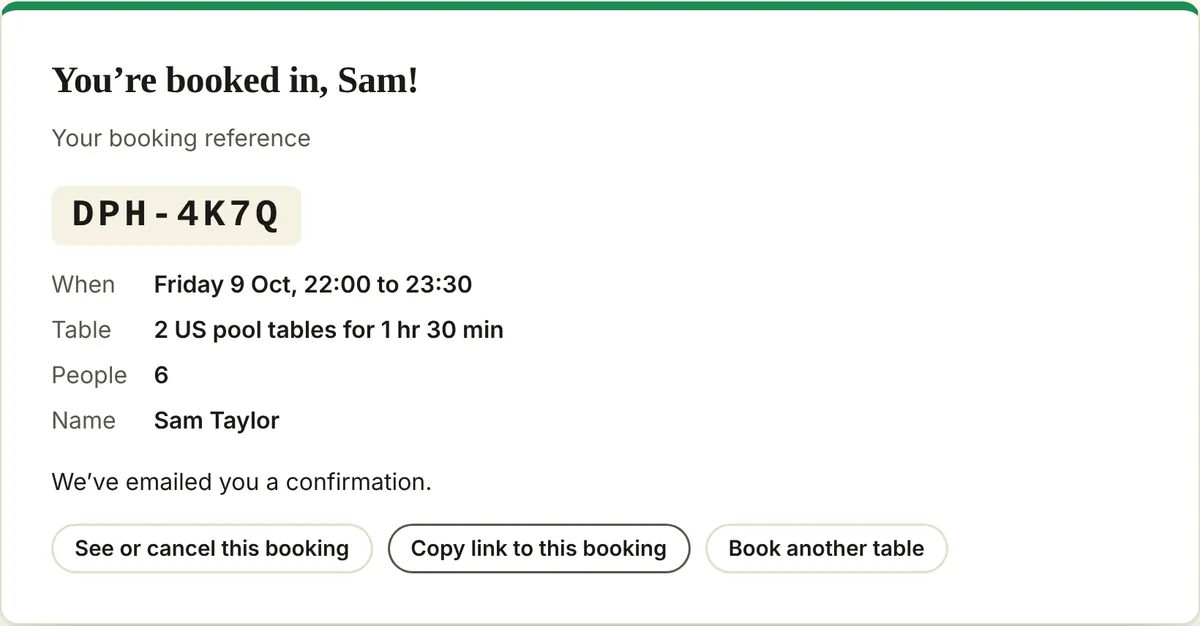
    The confirmation: booking reference DPH-4K7Q, the time, tables and people, and buttons to see or cancel the booking.

Main Events online

Sell the seats for your big nights

Put a Main Event on your website and customers book seats for their group, with live numbers left on each part of the room. You see them on the seat sheet with the deposit still to take.

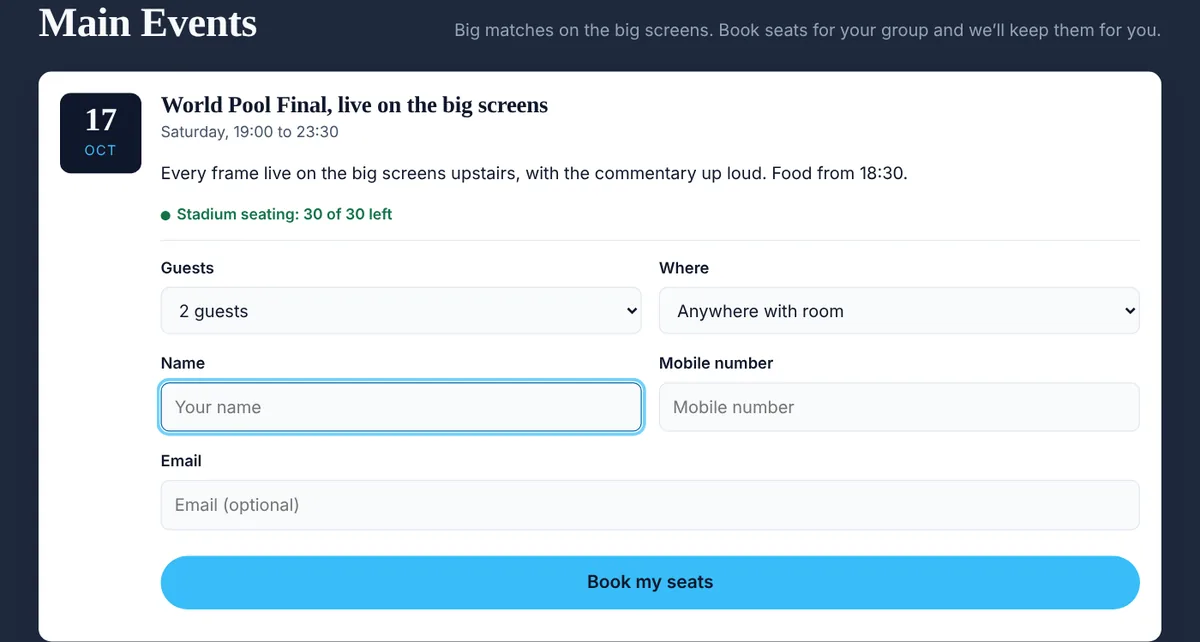
A Main Event on the venue website: the World Pool Final on the big screens, with 30 of 30 stadium seats left and a form to book seats for a group.
  • Customers can book tables, seats on a sofa or stadium seating, and seats at your Main Events.
  • Bookings are confirmed straight away and appear on your Timeline marked Website.
  • Times already allow for other bookings, events, closed floors, tables playing now and people on the waitlist.
  • Customers get a confirmation email from your venue and can check or cancel online up to a cut-off you choose.
  • You choose which tables can be booked online, the booking lengths, start times, notice needed, how far ahead, and the most tables and people per booking.
  • Works with any website, including Squarespace. It only answers the websites you list.

Works everywhere

Till PC, tablet or the phone in your pocket

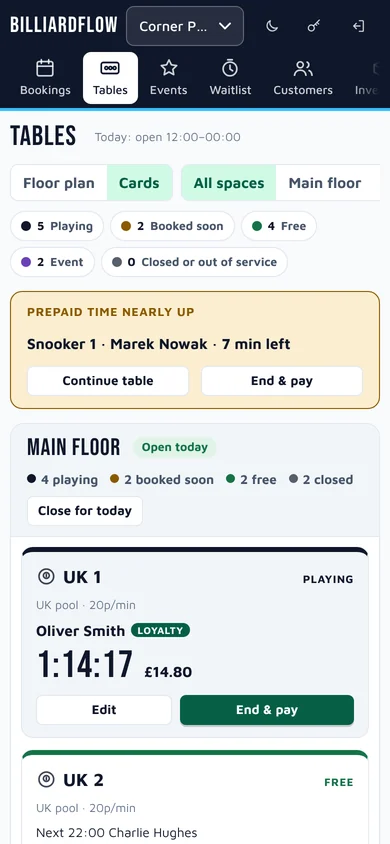
BilliardFlow runs in any modern browser. On a phone the floor plan becomes a list of cards, so staff can start and end tables from anywhere in the room.

Live View on a phone, shown as cards with running clocks and End and pay buttons.
Live View
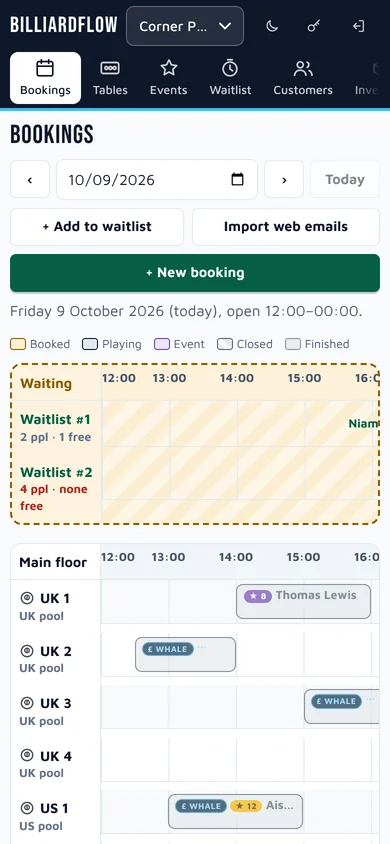
The Timeline on a phone.
Timeline
Inventory on a phone.
Inventory
Customers on a phone.
Customers

Light and dark

Easy on the eyes after midnight

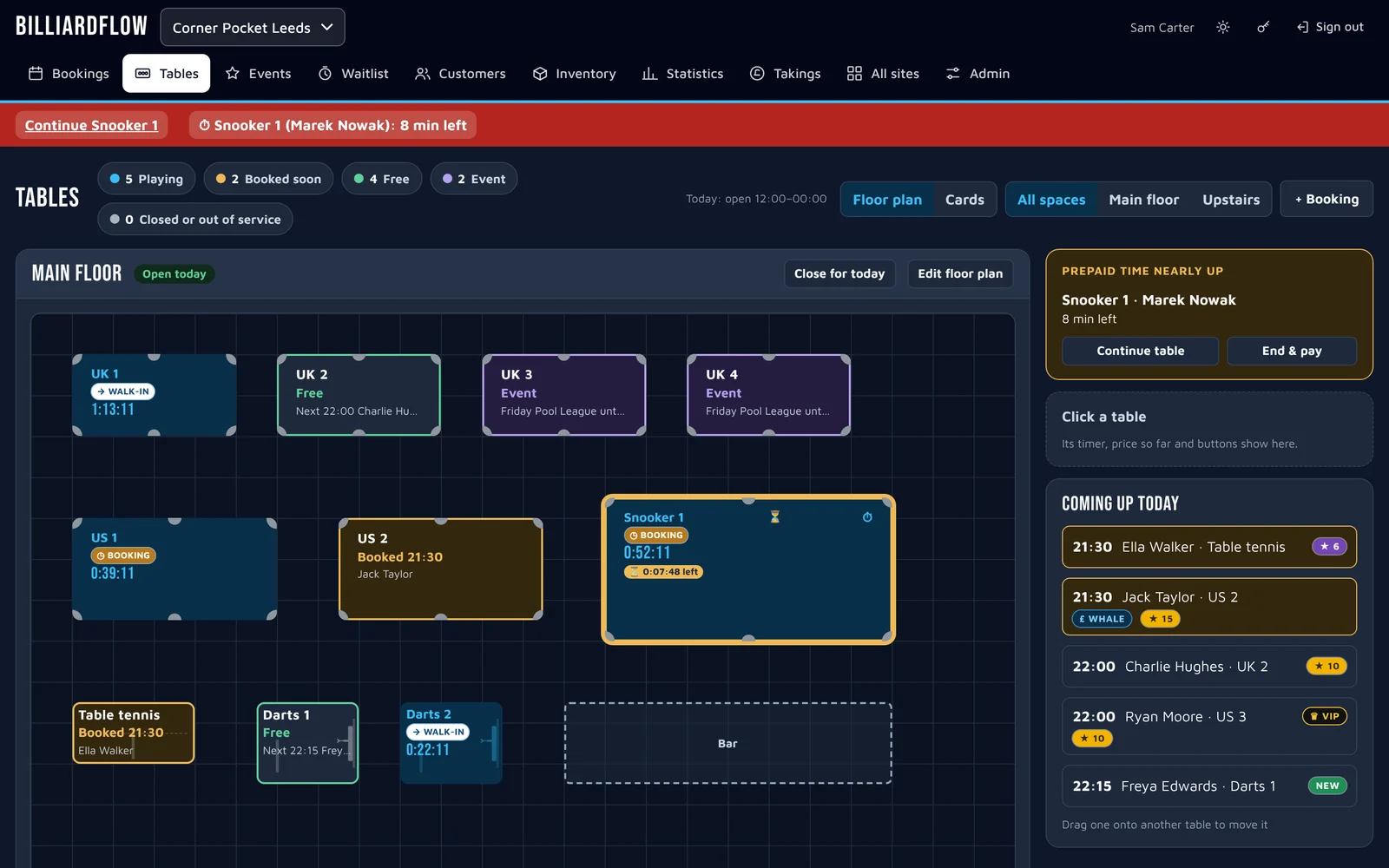
Switch to dark mode for a dim bar or a late shift. Drag the slider to compare.

Tables in light mode. The same Tables screen in dark mode.

Your data

Your business stays yours

Its own database

Each company has a separate database. Companies never see each other’s data.

The right logins

Venue staff and head office sign in separately and see different pages. Takings, Statistics and Admin are head office only.

Cards stay with Stripe

Your card details are handled by Stripe and never reach BilliardFlow.

Backups and export

Your admin can take a full backup or export bookings, customers and takings to spreadsheets at any time.

GDPR requests

Find, export or redact everything held about one person from a single screen.

Nothing to install

Works in any modern browser on PC, Mac, tablet or phone. Updates arrive on their own.

Questions

Things people ask

When can we start using it?

BilliardFlow is launching soon. Register your interest below and we’ll email you as soon as it’s ready, with everything you need to get started.

We have more than one venue. How does that work?

One company account covers all your venues. Head office sees every venue’s takings and statistics, and the All sites page shows them side by side.

Can staff have their own logins?

Yes. Your admin invites people by email and chooses whether each login is head office or venue staff. Venue staff see the floor, bookings, events, waitlist and customers. Takings, Statistics and Admin are head office only.

Does it take payments?

No. Staff take payment at your till as they do now. BilliardFlow works out what each table owes, including prepaid time and loyalty discounts, and records it in the day’s takings.

Can customers book from our website?

Yes, two ways. BilliardFlow can read the booking-form emails that land in your venue’s mailbox, or your web designer can add BilliardFlow booking to your site so customers see free tables and book in real time. Customers get a booking reference and can cancel online. You can try it on our demo venue.

What equipment do I need?

Anything with a modern web browser: the till PC, a tablet behind the bar or staff phones. There’s nothing to install.

Is our data safe, and what about GDPR?

Each company has its own separate database. Card details stay with Stripe. Head office can find, export and redact a person’s data when they ask, and your admin can take a full backup or a spreadsheet export at any time.

Coming soon

Register your interest

BilliardFlow is nearly ready. Tell us a little about your venue and we’ll be in touch as soon as it launches.

  1. Send the formIt takes a minute. We’ll reply from sales@billiardflow.com.
  2. Hear firstWe’ll email you as soon as BilliardFlow launches.
  3. Get set upWe’ll help you add your tables, invite your staff and open up.

We only use these details to contact you about BilliardFlow. See our privacy policy.